Chrome (Android)
Tap the lock icon next to the address bar. Tap Permissions → Notifications . Adjust your preference.
Chrome (Desktop)
Click the padlock icon in the address bar. Select Site settings . Find Notifications and adjust your preference.
Safari (iOS 16.4+)
Ensure the site is installed via Add to Home Screen . Open Settings App → Notifications . Find your app name and adjust your preference.
Safari (macOS)
Go to Safari → Preferences . Click the Websites tab. Select Notifications in the sidebar. Find this website and adjust your preference.
Edge (Android)
Tap the lock icon next to the address bar. Tap Permissions .
Find Notifications and adjust your preference.
Edge (Desktop)
Click the padlock icon in the address bar. Click Permissions for this site . Find Notifications and adjust your preference.
Firefox (Android)
Go to Settings → Site permissions . Tap Notifications . Find this site in the list and adjust your preference.
Firefox (Desktop)
Open Firefox Settings. Search for Notifications . Find this site in the list and adjust your preference.


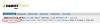
forex[/acronym].vamist.com/forum/divergente-t-1175.html#pid3680"]La cererea lui tradelover, forumul are acum o noua functie: forex[/acronym].vamist.com/forum/search.php?action=getpostshistory"]View Posts History. Cu ajutorul ei, puteti vedea toate posturile din ultimele 30 de zile, sortate dupa data, in ordine descrescatoare.
Linkul il gasiti scris cu rosu in partea stanga-sus (langa View New Posts si View Today's Posts).