Chrome (Android)
Tap the lock icon next to the address bar. Tap Permissions → Notifications . Adjust your preference.
Chrome (Desktop)
Click the padlock icon in the address bar. Select Site settings . Find Notifications and adjust your preference.
Safari (iOS 16.4+)
Ensure the site is installed via Add to Home Screen . Open Settings App → Notifications . Find your app name and adjust your preference.
Safari (macOS)
Go to Safari → Preferences . Click the Websites tab. Select Notifications in the sidebar. Find this website and adjust your preference.
Edge (Android)
Tap the lock icon next to the address bar. Tap Permissions .
Find Notifications and adjust your preference.
Edge (Desktop)
Click the padlock icon in the address bar. Click Permissions for this site . Find Notifications and adjust your preference.
Firefox (Android)
Go to Settings → Site permissions . Tap Notifications . Find this site in the list and adjust your preference.
Firefox (Desktop)
Open Firefox Settings. Search for Notifications . Find this site in the list and adjust your preference.


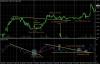



am gasit un sistem interesant pe ff mie mi se pare bunicel...pentru cei care nu stiu despre ce e vorba arata cam asa
- accelerator oscillator
- awesome oscillator
- parabolic SAR : valoarea originala era 0.2 dar merge mai bine cu 0.06 step 0.2
semnal buy : cand apare primul punct la pSAR si AC si AO sa fie in buy mode adica default verde
semnal sell : apare primul pSAR , AC si AO in sell mode default rosu
intrarea la urmatoarea lumanare...
cat despre stop loss si tp sper sa ma ajute cineva. metoda originala nu prea ajuta la sl si tp
see attachament
thanks