Chrome (Android)
Tap the lock icon next to the address bar. Tap Permissions → Notifications . Adjust your preference.
Chrome (Desktop)
Click the padlock icon in the address bar. Select Site settings . Find Notifications and adjust your preference.
Safari (iOS 16.4+)
Ensure the site is installed via Add to Home Screen . Open Settings App → Notifications . Find your app name and adjust your preference.
Safari (macOS)
Go to Safari → Preferences . Click the Websites tab. Select Notifications in the sidebar. Find this website and adjust your preference.
Edge (Android)
Tap the lock icon next to the address bar. Tap Permissions .
Find Notifications and adjust your preference.
Edge (Desktop)
Click the padlock icon in the address bar. Click Permissions for this site . Find Notifications and adjust your preference.
Firefox (Android)
Go to Settings → Site permissions . Tap Notifications . Find this site in the list and adjust your preference.
Firefox (Desktop)
Open Firefox Settings. Search for Notifications . Find this site in the list and adjust your preference.
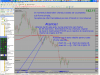
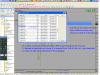
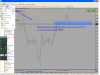
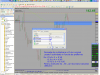
Inca un ajutor pentru incepatorii in MetaTrader 4.
Period_Convertor_Opt este un indicator care permite transformarea tf-urilor standard in asa numite tf-uri speciale.
Ex. h4 este transformat in h8
Instalarea acestui indicator este putzin mai dificila si m-am gandit sa va ajut cu un manual in imagini.
Etapa1 din manual se aplica oricarui indicator custom pe care vreti sa-l instalati pe platforma voastra.
Trebuie sa mentionez ca este absolut obligatoriu ca dupa Etapa1 sa restartati platforma de tranzactionare.
Sper sa intelegeti din imaginile atasate cum se face instalarea indicatorului Period_Convertor_Opt
Period_Converter_Opt.mq4