Chrome (Android)
Tap the lock icon next to the address bar. Tap Permissions → Notifications . Adjust your preference.
Chrome (Desktop)
Click the padlock icon in the address bar. Select Site settings . Find Notifications and adjust your preference.
Safari (iOS 16.4+)
Ensure the site is installed via Add to Home Screen . Open Settings App → Notifications . Find your app name and adjust your preference.
Safari (macOS)
Go to Safari → Preferences . Click the Websites tab. Select Notifications in the sidebar. Find this website and adjust your preference.
Edge (Android)
Tap the lock icon next to the address bar. Tap Permissions .
Find Notifications and adjust your preference.
Edge (Desktop)
Click the padlock icon in the address bar. Click Permissions for this site . Find Notifications and adjust your preference.
Firefox (Android)
Go to Settings → Site permissions . Tap Notifications . Find this site in the list and adjust your preference.
Firefox (Desktop)
Open Firefox Settings. Search for Notifications . Find this site in the list and adjust your preference.
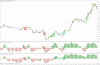
Ma ajuta careva in crearea unui expert bazat pe urmatoarea strategie :
- pe 5m eur/usd folosesti 2 indicatoare StochHistogram.
- primul cu setarile (14,3,3) al doilea (30,3,3).
- pentru fiecare tranzactie se foloseste contulx40 adica cu leverage de 40 nu un numar fix de loturi
- conditie de buy cand ambele indicatoare inchid bara de 5m peste nivelul 0 al indicatorului
- conditie de sell cand ambele indicatoare inchid bara de 5m sub nivelul 0 al indicatorului
- take profit 20 pipsi, SL 10 pipsi .
- trazactiile se fac doar la inchiderea candelei de 5m
StochHistogram.ex4
Editat de em3rveillement