Chrome (Android)
Tap the lock icon next to the address bar. Tap Permissions → Notifications . Adjust your preference.
Chrome (Desktop)
Click the padlock icon in the address bar. Select Site settings . Find Notifications and adjust your preference.
Safari (iOS 16.4+)
Ensure the site is installed via Add to Home Screen . Open Settings App → Notifications . Find your app name and adjust your preference.
Safari (macOS)
Go to Safari → Preferences . Click the Websites tab. Select Notifications in the sidebar. Find this website and adjust your preference.
Edge (Android)
Tap the lock icon next to the address bar. Tap Permissions .
Find Notifications and adjust your preference.
Edge (Desktop)
Click the padlock icon in the address bar. Click Permissions for this site . Find Notifications and adjust your preference.
Firefox (Android)
Go to Settings → Site permissions . Tap Notifications . Find this site in the list and adjust your preference.
Firefox (Desktop)
Open Firefox Settings. Search for Notifications . Find this site in the list and adjust your preference.




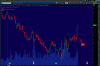
Salutari stimatilor,
nu stiu cum la voi , insa la noi in Chisinau persista un soare ca de vara si nu avem cum sa nu ne bucuram de asta.
Si acum la treaba:
Pentru intraday:
Swing trade:
long: $RDC;
short: $ABBV
http://g.iceimg.com/Y4w2AroZ/lt-thumb.jpg
http://g.iceimg.com/Y_b8OCbp/lt1-thumb.jpg
Vreau sa va doresc un inceput de saptamina reusit si sa aveti profituri.
#Trade with MTG
http://mtgcorporate.com
email: trading@mtgcorporate.com
skype: mtg.corporate
facebook.com/mtgcorporate
@MTGCorporate
"Oferim instruire gratuita full pentru tranzactionarea pe NYSE si NASDAQ"
Editat de Sergiu Fuior